
Welcome to the Product Pulse documentation. This guide will help you integrate and use Product Pulse in your Products, as well as leverage our comprehensive API.
Getting started
Here is simple getting started guide. We built are UI to be intuitive & to enable your Products to continuously grow also within our UI.
- Create ProductPulse account on our Signup page
- Create your first Product from Main Dashboard
- Configure it however you like. Whole Product Model & its UI are built in a way, that you can continuously enable new Product Features as you and your pricing needs grow.
- Integrate Price Calculation Endpoint in your application to start leveraging our Product Catalog & its pricing capabilities.
How to integrate
ProductPulse offers seamless integration of Product Catalog to enhance your product’s pricing capabilities.
Product Catalog serves as a replacement for Pricing Logic & Product Configuration Store in your application. So basically, all you need to integrate is to call our Pricing & Product Configuration endpoints.
Pricing endpoint substitutes places, where you need to show specific price of the product – for example: either on your website or when you are about to issue new Payment Request to your customer.
Product Configuration endpoint is most often called, when you want to configure your Product for the customer or other places, when you need to retrieve some product specific parameters.

API Documentation
Product Pulse follows an API-first approach, meaning that every feature available in our user interface can also be accessed programmatically through our API.
All information on how to use our API with all available endpoints can be found here: API Documentation
Best Practices
Leveraging full potential of Product Configuration Options
Each entity in Product Catalog, like Product, Price List, Scenario, Tier, Add On, etc can have its own JSON encoded configuration. Full Product configuration can then be retrieved from Product Configuration Endpoint. This configuration can be used as a way, to pass parameters to adjust your Product.
Spend some time on properly defining naming and structure of these parameters. (This might be good exercise to with your Pricing Manager or Product Manager or someone, who is responsible for Pricing strategy in your Company.) If done well, then you’ll give people responsible for your Pricing strategy powerful tool, where they’ll be able to experiment with different Pricing without, or with just limited, need of additional development capacity.
Test your Pricing Model
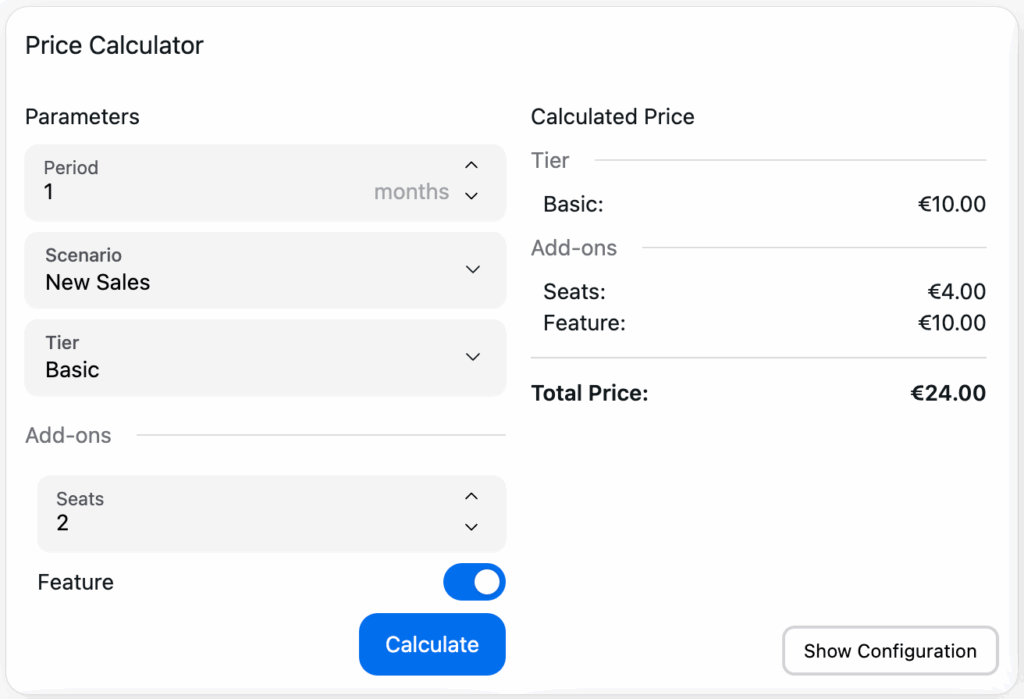
Don’t wait until after launch to discover pricing problems—leverage the Price Calculator in our UI to validate and fine-tune your pricing model with confidence.
Testing your pricing model before launch is essential to ensure it meets both your business goals and your customers’ expectations. With our Price Calculator, you can easily simulate and examine your pricing structure directly in the UI—well before your product goes live.
For example, if you’re offering tiered plans like Basic, Advanced, and Pro (as shown above), use the Price Calculator to test how each configuration affects the final price. This tool provides a complete price breakdown, so you can verify that every feature and tier is priced correctly and transparently.
By experimenting with different combinations and reviewing the detailed calculations, you’ll gain valuable insights into how your pricing model works in practice. This upfront testing helps you identify and resolve issues early, ensuring your pricing is both competitive and easy to understand for your customers.
Do you want to try it out?
Create free account & test it all out!
or